
Fawaz Adebisi
“I was qualified for the NCDMB Foundation scholarship. I tried to fill the form online myself, but because of the way it was designed, I had to give it to someone to help me. Unknown to me, the person filled out incorrect data, and that was how I lost out on that scholarship,” Adams Esther, a visually impaired lady, bitterly narrated.
Esther’s story is not an isolated incident; being a small business owner in Lagos, it is the predictable outcome of a digital infrastructure that, by design or neglect, renders Nigeria’s estimated 1.3 million blind persons and 24 million visually impaired citizens invisible.
To understand the scope of this exclusion, working closely with an Artificial Intelligence and Machine Learning engineer, Samuel Kalu, who works at Peepalytics AI, a comprehensive technical analysis was conducted on 73 Nigerian websites spanning government services, media outlets, and civil society organisations, including those specifically serving persons with disabilities.
The findings reveal a pattern of systematic inaccessibility that extends from the highest levels of federal government to organisations ostensibly advocating for disability rights.
The first phase of this investigation reveals a story about digital structural exclusion.
The Zero Problem
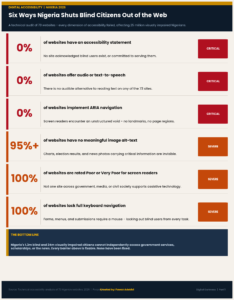
Of the 73 websites analysed, including critical government portals like the National Identity Management Commission, Joint Admissions and Matriculation Board, and some of the 36 state government websites, the assessment revealed:
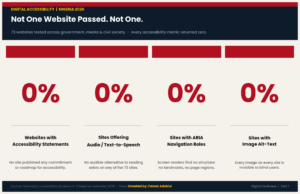
Every one of these failures was consistent across all 73 sites, government, media, and civil society alike, rendering these platforms effectively unusable for blind citizens due to fundamental design choices.
When screen readers encounter these sites, they find silence where there should be information, unmarked buttons where there should be labels, and images that exist only as void.
Government Services: The Gatekeepers of Exclusion
The analysis examined 52 government websites, from federal agencies to all state government portals. The verdict was unanimous; all received ratings of “Very Poor” for accessibility to blind users.
Federal Government Portals
Critical federal services that control citizens’ access to basic rights and opportunities, NIMC for national identification, JAMB for university admissions, NYSC for mandatory national service, and Nigerian Immigration Service for passport and visa services, all share identical failures:
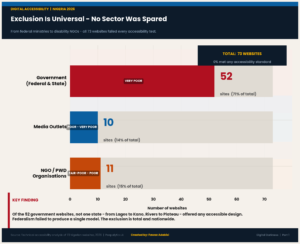
The implications of this on blind users last long. For;
NIMC: Visually impaired citizens cannot independently verify or update their national identification information, the gateway to banking, voting, and most government services.
JAMB: University admission registration is impossible without sighted assistance, forcing blind students to share sensitive academic and personal information with third parties.
NYSC: The mandatory national youth service registration portal excludes blind graduates from independently managing their civic obligation.
Immigration Service: Travel documents, passports, and visas cannot be independently applied for or tracked.
State Government Portals: Over 26 States, Zero Accessibility
Almost every single state government website, from Lagos to Kano, from Rivers to Plateau, received the same “Very Poor” rating. The uniformity is remarkable and damning. Whether in Nigeria’s economic capital, Lagos, or its federal capital territory, Abuja, blind citizens face identical barriers to accessing state services, information, and opportunities.
This represents a complete failure of federalism to serve as a laboratory for innovation, as no state has emerged as a model or taken the lead. The exclusion is total and nationwide.
Media Outlets: Information as a Visual Privilege
Ten major Nigerian media outlets were analysed, representing the primary digital news sources for millions of citizens: Punch, Vanguard, ThisDay, Daily Post, Channels TV, The Guardian Nigeria, Leadership, Nigerian Tribune, and Sahara Reporters.
All received ratings between “Poor” and “Very Poor” for accessibility to blind users, although access to Premium Times seemed tough.
The Pattern of Failures:
Most images lack alternative text (“Mostly No” across platforms)
Limited to no ARIA roles for navigation
Partial keyboard navigation at best
No audio alternatives or text-to-speech
Zero accessibility statements
Premium Times, despite its reputation for investigative journalism, was found to provide videos without captions, making them inaccessible to VI users. Channels TV, a major broadcast outlet with significant digital presence, only provides partial alternative text on some images. Vanguard, which does provide alt text on all images, still receives a “Very Poor” rating due to failures in screen reader support, ARIA implementation, and lack of accessibility commitment.
The implications extend beyond news consumption as Media outlets frequently publish critical public interest information, government policy announcements, emergency alerts, election results, and health advisories, often in image formats that screen readers cannot parse. For blind citizens, civic participation is mediated by when and if a sighted person is available to read these images aloud.
Civil Society and PWD Organizations: The Bitter Irony
Perhaps the most revealing failures are found in the websites of organisations dedicated to transparency, accountability, and persons with disabilities advocacy. Eleven such organisations were analysed, including:
BudgIT and Tracka (budget transparency and government accountability)
Joint National Association of Persons with Disabilities
National Commission for Persons with Disabilities
The Albino Foundation (includes a visual impairment focus)
Festus Fajemilo Foundation (blind/VI support)
Christian Blind Mission Nigeria
Every single organisation received ratings of “Poor” to “Fair-Poor” for accessibility. Even organisations whose explicit mission includes serving blind and visually impaired persons fail to make their own digital presence accessible.
This represents a fundamental contradiction: advocacy organisations that cannot be independently accessed by the populations they claim to serve. The National Commission for Persons with Disabilities, a government body specifically mandated to advance disability rights, operates a website that effectively excludes blind citizens from accessing information about their own rights and services.
Understanding the Technical Failures
To understand what these ratings mean in practice, it’s essential to understand how blind users navigate the web and what these websites fail to provide.
Screen Readers and the Silent Web
Blind users rely on screen readers, software that converts digital text into speech or Braille. The most common screen readers used by Nigerians include VoiceOver (iPhone), TalkBack (Android), JAWS, and NVDA (desktop). These tools work by reading the underlying code of websites and applications, announcing text, describing interface elements, and allowing keyboard navigation.
But screen readers can only read what developers provide. When the analysis found “Poor” or “Insufficient” screen reader support, it means;
Form fields without labels, the screen reader announces “edit box” with no indication of what information to enter
Buttons marked only as “button” with no description of their function
Images that exist as blank spaces in the audio stream
Interactive elements that cannot be reached or activated via keyboard
Navigation menus that become mazes of unlabeled links
Alternative Text: The Missing Descriptions
Alternative text (alt text) is the description developers can attach to images, allowing screen readers to announce what the image contains. It’s a basic accessibility requirement, mandated by WCAG (Web Content Accessibility Guidelines) standards.
The analysis found that across government, media, and NGO websites, alt text is either absent (“No”) or inconsistently applied (“Mostly No” or “Partial”). This failure is particularly devastating for media outlets and government agencies that frequently publish critical information as images:
Government notices and announcements are posted as JPEG files
Infographics explaining policy changes or public health information
Charts and data visualisations
Election results and voting information
ARIA Roles and Landmarks: Lost Navigation
ARIA roles and landmarks are code markers that help screen readers understand the structure and purpose of different page sections. They allow blind users to quickly navigate to main content, skip repetitive navigation menus, identify forms, and understand page hierarchy.
The analysis found zero ARIA implementation across government websites and limited to no implementation across media and NGO sites. This means blind users must navigate websites linearly, hearing every element in order, unable to skip to the content they need. What takes a sighted user seconds, scanning a page to find a form or article, can take a blind user minutes of tedious navigation.
Keyboard Navigation: Trapped by the Mouse
Many blind users navigate websites using only a keyboard, as visual mouse pointing is not an option. Accessible websites ensure all interactive elements can be reached and activated via keyboard alone. The analysis found keyboard navigation to be “Unknown” (untested or unclear) or “Partial” (some elements unreachable) across nearly all sites. This means functions that require mouse clicks, dropdown menus, image uploads, file attachments, and form submissions may be completely inaccessible.
The Accessibility Statement Gap
An accessibility statement is a public declaration of an organisation’s commitment to digital accessibility. It typically includes:
What accessibility standards the site aims to meet (usually WCAG 2.0 or 2.1)
Known limitations or areas for improvement
Contact information for reporting accessibility issues
Alternative ways to access information or services
Not a single website among the 73 analysed provides an accessibility statement. This absence reveals that accessibility is not even on the radar of these organisations. The barriers blind users face are not acknowledged failures to fix; they are invisible non-issues. There is no commitment to improve because there is no recognition that improvement is needed.
What This Means for Blind Nigerians:
These technical failures translate into concrete barriers that shape every aspect of blind citizens’ lives. The data reveals a pattern of systematic exclusion that operates at multiple levels:
Civic Exclusion
When the Independent National Electoral Commission (INEC) website is inaccessible, blind citizens cannot independently register to vote, verify their registration status, or find their polling units. When state government portals fail to provide accessible information, blind citizens cannot track public services, access state programs, or engage with local governance.
Economic Exclusion
When the Corporate Affairs Commission (CAC) and Federal Inland Revenue Service (FIRS) websites are inaccessible, blind entrepreneurs cannot independently register businesses, file taxes, or access business development resources. When scholarship and grant portals are inaccessible, blind students and professionals are locked out of opportunities for advancement.
Information Exclusion
When all major media outlets fail to provide accessible content, blind citizens are excluded from the primary channels of news, analysis, and public discourse. When government agencies publish policy information as inaccessible image files, blind citizens are denied equal access to information that affects their rights and welfare.
Dignity Exclusion
Perhaps most insidiously, these failures force blind citizens into perpetual dependence on sighted intermediaries. Every inaccessible website becomes an occasion for privacy violation, as blind users must share passwords, financial information, personal documents, and confidential communications with whoever happens to be available to help. Independence, the ability to manage one’s own affairs privately and autonomously, is systematically denied.
The Pattern of Neglect
The uniformity of failure across 73 websites, spanning different sectors, different developers, and different platforms, reveals that this is not a series of isolated oversights. This is a structural problem rooted in design practices that treat accessibility as optional, unknown, or irrelevant.
Why Government Is Not Acting
Nigeria’s legal framework for disability rights contains a significant blind spot when it comes to digital accessibility. While Nigeria’s Discrimination Against Persons with Disabilities (Prohibition) Act of 2019 establishes general protections against discrimination, it makes no explicit mention of digital accessibility, leaving a legal vacuum. The Act does address physical accessibility through Part II (Sections 3–4), Part III (Sections 10–12), and Part IV (Sections 13–15), but digital spaces remain unaddressed.
However, this stands in contrast to Ghana, a neighbouring country to Nigeria, which amended its Persons with Disability Act in 2020 to specifically mandate “adequate accessibility to information, communications, including age-appropriate technologies and systems,” requiring public and private service providers to ensure formats like screen-reader compatibility, and sign-language interpretation.
These technical barriers have human consequences and behind every inaccessible form is a blind student who cannot apply for admission. Behind every image-only announcement is a blind citizen excluded from information. Behind every unlabeled button is a blind entrepreneur who cannot manage their business independently.
The data provides the evidence. Meanwhile, the next question is: what do these numbers mean when experienced by actual blind Nigerians trying to navigate their daily lives?
Part 2 of this investigation will explore the human stories behind these statistics, the lived experiences of blind Nigerians confronting these barriers every day, and what they say needs to change.
Methodology Note
The 73 websites analysed were evaluated against standard accessibility criteria, including screen reader compatibility, alternative text provision, ARIA implementation, keyboard navigation, colour contrast, audio/text-to-speech availability, semantic HTML structure, and presence of accessibility statements or WCAG compliance documentation. Ratings of “Very Poor,” “Poor,” and “Fair-Poor” indicate multiple critical failures that render the site effectively unusable for blind users without sighted assistance.
